GIF resizer
Type the pixel cap for the place you will send the GIF. Apply resamples every frame to that width and height, and the file stays in this browser.
Apply to see the file size.
Open the GIF
Choose a file on this page.
Set the pixels
Pick a square preset, or type the width and height. Lock the ratio when the shape should stay.
Apply, then download
Apply writes the GIF and shows its real byte size. Download saves that file.
What pixel cap does the place you send it set?

Read that cap from the place you are sending the file. A slot has a fixed opening. The drawing has to meet it. This page does not bend one edge. It resamples every pixel of the open GIF onto the width and height you type.
A green ticket starts 48 pixels wide and 40 tall, then steps toward a dark slot that never moves. The slot is 64 by 40. By the last frame the ticket is 12 pixels tall and sitting inside that opening. Each of the eight frames waits 9 centiseconds, and the loop repeats.

How big can a Discord custom emoji GIF be?
Discord custom emoji are a square of at most 128 by 128 pixels, and the file has to stay under 256 kilobytes. Pick the 128 preset, Apply, and read the byte line. Until Apply, this page does not guess the file size.
The badge beside this note is 128 pixels wide and only 48 tall. A clay rim sits on some frames and drops out on others, so the ground shows through. Matching the 128 width is not the same as fitting the emoji square.
Why can a smaller canvas make a heavier file?
| 80×40 | 409 bytes |
|---|---|
| 40×20 | 186 bytes |
| 128×64 | 465 bytes |
| 320×160 | 1,198 bytes |
Width and height are the canvas. The byte count is how the frames were packed, so a smaller canvas can still grow the file. One coral still, a flat field with a white square, was Applied at four windows. 80 by 40 is 409 bytes. 40 by 20 is 186 bytes. 128 by 64 is 465 bytes. 320 by 160 is 1,198 bytes.
40 by 20 is half the width and half the height, so the new grid has a quarter of the pixels. The file did not shrink to a quarter of 409. It landed at 186. The header, the color table, and the frame data do not shrink just because the picture does.
128 by 64 has about 2.56 times the pixels, and the file only grew by 56 bytes, from 409 to 465. A flat coral field and a flat white square survive a modest upsample as long runs of one color. Bytes track how those colors pack, not the area of the rectangle.
320 by 160 is sixteen times the area, and the file is 1,198 bytes, just under three times 409. The white square's edge has to be restated on a finer grid, and those turns cost bytes. Nothing on this page guesses that number before Apply.

This sheet is paper and ink only, 80 by 48. The ink bar starts 16 pixels wide and grows from the left across three frames. Each frame waits 45 centiseconds, so one pass takes a little over a second before it repeats.
The written file is 488 bytes. That is larger than the 409-byte coral still, even though this loop uses two colors and the still has more colors in its table. Three frames cost more than one frame of a slightly bigger picture. Palette size is not the bill.
Why does the byte count wait until after Apply?
The four windows above are known only because each one was written out. A shorter canvas does not tell you the length. Apply is the measurement.
When is the byte line a real file size?
After Apply, and only then. Before that the line is a prompt, not an estimate. Download saves the file whose length that line just printed. A second Apply at the same width and height does not resample.
Does one width and height cover every frame?
Yes. The width and height you Apply are the new grid for the whole file. There is not a separate box on frame 3. Frame order stays as opened.

Six ribs start stacked on a sheet 72 pixels wide and 120 tall. Each frame the top rib is left undrawn, and the last frame keeps only the bottom rib. The sheet stays 120 pixels tall. Empty paper is not cropped away.
Removing picture is not the same as a shorter file, and a shorter file is not the same as a shorter canvas. Apply reports the container you asked for, then the bytes of that container.
A green block drops onto a dark ledge across seven frames, and this file has no loop block. When the last frame finishes, a player that honors the missing block stops. It does not jump back to the first frame.
If you need the fall to repeat, that is a different edit. This page only changes the pixel grid.

Why does the picture look soft after a resize?
The new width and height are a new pixel grid. The old frames are sampled into that grid, so a jump upward has fewer source pixels than the new slots and the edges look soft. The preview after Apply is that sampled file, not a zoom of the page.

The bar starts 120 pixels wide on a 144 by 36 sheet and loses 30 pixels of width each frame, while new specks appear inside whatever width remains. The palette has 16 colors. By the last frame the bar is 30 pixels wide and holds 32 specks.
A resize onto a smaller grid drops some of those specks. They are single pixels, and a sample that falls between them does not keep them. A resize onto a larger grid does not invent a seventeenth color. The resampler picks indexes on the new grid. It does not extend the table because the canvas got wider.
When should you not make it a square?
The bar on this 96 by 96 sheet starts 84 by 24. Each step it gets narrower and taller until it sits as a 36 by 36 square in the middle. Both edges move. The paper around the bar stays put.

Make it a square when the slot demands a square. Leave the shape alone when the slot only limits the long edge, or when a wide picture is supposed to stay wide.
Do 128, 320, and 480 keep a wide picture wide?
No. Each of those presets writes the same number into width and height, so a 400 by 100 GIF becomes a square. Leave the preset on Original and type both fields if the old shape should remain.

What does Lock ratio follow?
The green rectangle starts at 20 by 10. Each frame adds 14 to the width and 7 to the height, so it stays twice as wide as it is tall. The last frame is 132 by 66 on a 150 by 75 sheet, with a dark cap along the top edge.
It follows the two numbers in the fields at the moment you turn it on. Type 200 and 80 first, then lock, and the next edit keeps 200:80. It does not reach back to the file after those fields have changed.
Do the per-frame waits stay after the pixels change?
They stay with their frames. Changing the wait is not what the width and height fields do.
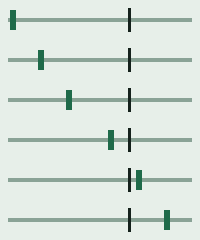
A six-pixel mark walks a grey rule toward a dark post that stands at 128 pixels. Twelve frames, and each one waits 4 centiseconds, the shortest wait in this set. The file stores 4. Browsers often hold a wait that short, but the delay word is still 4, not a rounded tenth of a second.

A dark jamb stays at the left while a green door grows, then rests. The first three frames wait 8 centiseconds. The fourth waits 80. The hold is the delay word on that last frame, not a pause the browser invented. A resample leaves those words where they are.
This file is 1,114 bytes, close to the 1,198-byte upsample of the coral still, from a much smaller canvas. Area is the wrong predictor. The long last frame is a wait, not extra pixels.